























TimeForge gives you over 150 prebuilt reports across scheduling, HR, attendance, and sales, organized in one central dashboard. You can access reports from your phone using the Manager mobile app, or export them to Excel or PDF in just two clicks.

TimeForge connects with your point of sale (POS) to give you hourly labor and sales data. Compare forecasts to actuals and monitor performance across all your locations in one place. Our dashboards make insights easy to access, anytime.
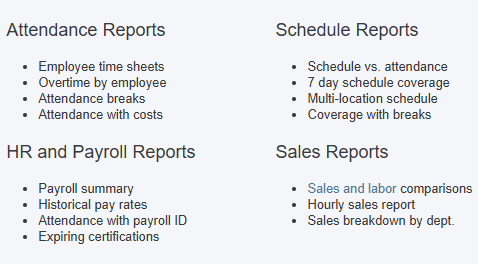
Access over 150 ready-to-use reports across labor, payroll, and sales, already formatted and available instantly. Whether you’re tracking overtime, certifications, or scheduling vs. attendance, TimeForge gives you the right data without manual work.

Choose how often you want reports delivered—weekly, monthly, or on your own terms. It’s easy to schedule reports for specific locations, departments, and time periods. You can also save frequently used reports as favorites so they’re always easy to find on your dashboard.
Create custom reports by choosing your report type: attendance, scheduling, or sales, etc; And selecting the data you want. Export to Excel, CSV, or PDF in seconds with our easy-to-use report builder.

Quickly spot labor issues like early clock-ins, long punches, and excessive overtime. TimeForge tracks paid, unpaid, required, and optional breaks to help you stay compliant with local labor laws.
“The range of TimeForge’s features and reporting capabilities is extensive. There’s been seamless integration with our payroll system. The best part about TimeForge is customer support. Mike got us set up, trained new managers individually, and was always super responsive whenever we had a question. I can’t say enough good things about TimeForge!”

You can access pre-built reports for scheduling, HR, attendance, and sales, over 150 in total, to quickly view key labor metrics.
You can schedule reports to be delivered to your email on a weekly, bi-weekly, or monthly basis, filtered by location, department, and time period.
Yes, reporting tools can highlight early clock-ins, long punches, and excessive overtime to help reduce labor waste.
Use reports that track paid, unpaid, required, and optional breaks alongside hours worked to ensure compliance with break-related regulations.
Yes, there are tools to compare forecasted sales or labor with actual numbers, helping you adjust strategy based on real results.
Reports can be generated by store or across multiple locations to give a full picture of labor performance across the business.
You can build reports in seconds by selecting the report type and data fields, then exporting them as Excel, CSV, or PDF files.
Reports you use regularly can be saved as favorites and will show up first in your reporting dashboard for quick access.

As we like to say, “the proof is in the pudding.” Let our rockstar customer success team give you a live demonstration of TimeForge in action, tailored to your needs.

We use cookies to personalize content, provide social media features, and analyze our traffic. We also share information about your use of our site with analytics and advertising providers. You can change your preferences at any time. For more information, please see our Privacy Policy and Cookie Policy. Privacy Policy Cookie Policy